Mobile payment processing means taking card payments away from a fixed counter, using a smartphone, a small card reader paired to that phone, or a portable terminal with its own connection. Most mobile businesses pay a flat rate per sale, such as Square's 2.6% + 15 cents for in-person payments on its Free plan. The right setup depends on whether you need chip cards, a printed receipt, offline mode and a device that doesn't drain your phone.
How Can I Accept Mobile Payments?
There are three ways to take a card on the go. Each one still runs through a payment processor; what changes is the hardware in your hand.
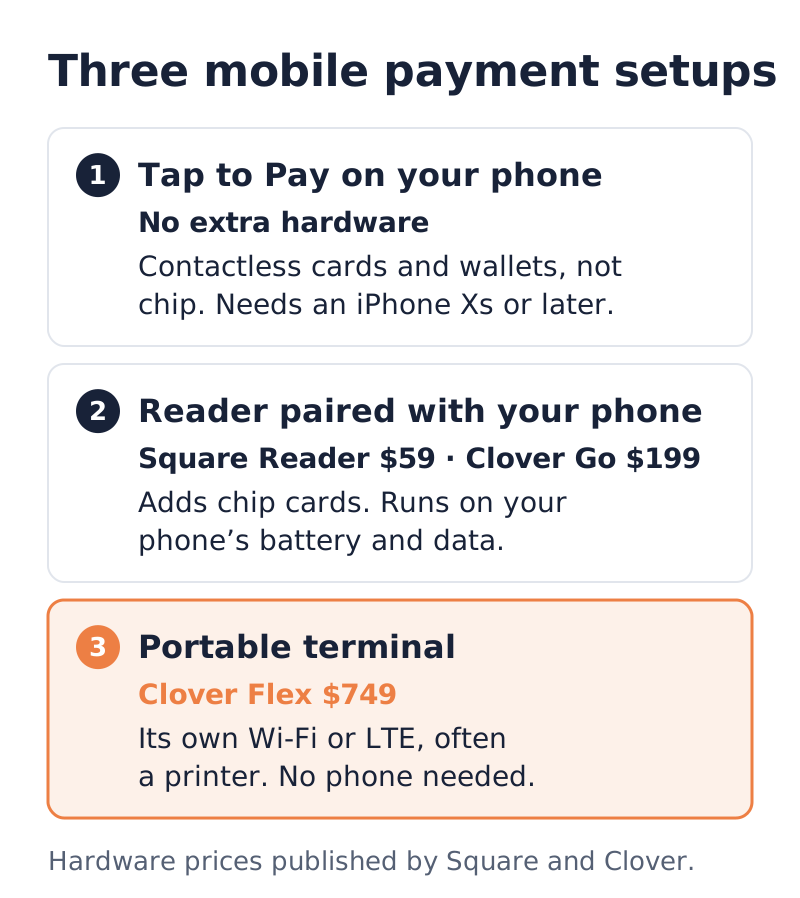
- Your phone alone (Tap to Pay). A payment app turns your iPhone or Android phone into a contactless reader. No extra hardware.
- A card reader paired with your phone. A pocket-size reader connects to the app over Bluetooth and adds chip (dip) acceptance.
- A portable terminal. A handheld device with its own screen, Wi-Fi or cellular connection and often a receipt printer. It doesn't need your phone at all.
Phone tap-to-pay vs card reader vs portable terminal
| Tap to Pay on your phone | Reader paired with your phone | Portable terminal | |
| Hardware cost (published) | None | Square Reader $59; Clover Go $199 with the Starter plan | Clover Flex $749, or $40 a month for 36 months |
| Chip cards (dip) | No, contactless only | Yes | Yes |
| Contactless cards and wallets | Yes | Yes | Yes |
| Connection | Your phone's Wi-Fi or cellular data | Bluetooth to your phone | Its own Wi-Fi or LTE (Clover Flex) |
| Printed receipt | No | No | Clover Flex has a built-in printer |
| Offline payments (Square) | Not supported | Supported on current Square readers | Supported on Square Terminal and Handheld |
The hardware prices come from Square's and Clover's own product pages, and the offline rules come from Square's help center. Other providers set their own rules, so check the one you're signing with.
Tap to Pay on your phone
Apple says Tap to Pay on iPhone requires an iPhone Xs or later and a supported payment app, and that it accepts contactless credit and debit cards, Apple Pay and other digital wallets, including Android phones, with no extra terminals or hardware. Apple also notes that some contactless cards may not be accepted by your payment app and transaction limits may apply.
On Android, Square's setup guide asks for Android 9 or higher with NFC turned on and developer options turned off. Square says Tap to Pay on Android doesn't work on the Samsung Galaxy S8, S9 or Note 9.
Tap to Pay is the cheapest way to start, but a customer with a chip-only card, or a card with a broken contactless antenna, can't pay you with it. For more on how tapping works, see our contactless payments and tap to pay guide.
A card reader paired with your phone
A Bluetooth reader adds chip acceptance and keeps the phone in your hand. Clover lists the Clover Go reader as accepting chip and contactless payments, including Tap to Pay on iPhone through the Clover Go app, Apple Pay, Google Pay and Samsung Pay. Clover rates its battery at about 160 dip or 130 contactless transactions per charge, and lists iOS 15 and Android 9.0 or higher as compatible.
The catch is that the reader depends on your phone's battery and data connection. If the phone dies at a festival, so does checkout.
A portable terminal
A portable terminal is a full payment device you carry. The Clover Flex has a nearly 6-inch touchscreen, a built-in thermal printer, Wi-Fi and LTE, and Clover rates its battery at "at least 8 hours of use for a typical SMB." Dejavoo's P3 Android wireless terminal lists 4G, Wi-Fi, a 5-inch touchscreen, a removable battery and an EMV-certified NFC reader.
This is the setup for food trucks, mobile mechanics and anyone who wants the phone free for other work. Payment USA sells Clover devices and deploys Dejavoo terminals; see our merchant terminals page and the Dejavoo credit card machine guide for the wireless models.
What Are the Three Types of Mobile Payments?
The phrase "mobile payments" gets used for three different things, and search results mix them up:
- Mobile point of sale: the merchant accepts a card on a phone, reader or handheld terminal. That's what this guide covers.
- Mobile wallets: the customer pays by tapping a phone or watch, using Apple Pay, Google Pay or Samsung Pay. Every setup above accepts these, because a wallet payment is a contactless payment.
- Remote mobile payments: the customer pays from their own phone through a payment link, an invoice or a QR code. These are priced as card-not-present or as separate products. PayPal, for example, prices QR code transactions on its Point of Sale product at 2.29% + 9 cents.
What Are Some Popular Mobile Payment Processing Apps?
Apple says Tap to Pay on iPhone works with hundreds of payment apps. Three that publish their US mobile pricing:
| App | In-person card rate (published) | Hardware option |
| Square Point of Sale, Free plan | 2.6% + 15 cents | Square Reader, $59 |
| Square, Plus and Premium plans | 2.5% + 15 cents; 2.4% + 15 cents | Same readers |
| Clover Go app, Starter plan | "As low as" 2.6% + 10 cents | Clover Go reader, $199 |
| PayPal Point of Sale | 2.29% + 9 cents (card present) | Subject to PayPal eligibility and approval |
Square's plans also charge 3.5% + 15 cents when you type a card number in by hand. Square says businesses processing over $250,000 a year can ask about custom pricing. Clover's Essentials plan adds $29.95 a month and lists rates "as low as" 2.5% + 10 cents.
How Much Does Mobile Credit Card Processing Cost?
Your monthly cost is the percentage times your sales, plus the per-sale fee times your number of sales, plus any monthly software fee. The per-sale fee matters more than most owners expect when tickets are small.
Worked example: a food truck's monthly fees
A fictional food truck, Taco Run, takes 800 card sales a month at an average of $15, which is 800 x $15 = $12,000 in card sales. Here is what each published in-person rate costs at that volume:
| Rate | Percentage part | Per-sale part | Monthly total | Effective rate |
| Square Free, 2.6% + 15 cents | $12,000 x 2.6% = $312.00 | 800 x $0.15 = $120.00 | $432.00 | 3.60% |
| Clover Go Starter, 2.6% + 10 cents | $312.00 | 800 x $0.10 = $80.00 | $392.00 | 3.27% |
| PayPal Point of Sale, 2.29% + 9 cents | $12,000 x 2.29% = $274.80 | 800 x $0.09 = $72.00 | $346.80 | 2.89% |
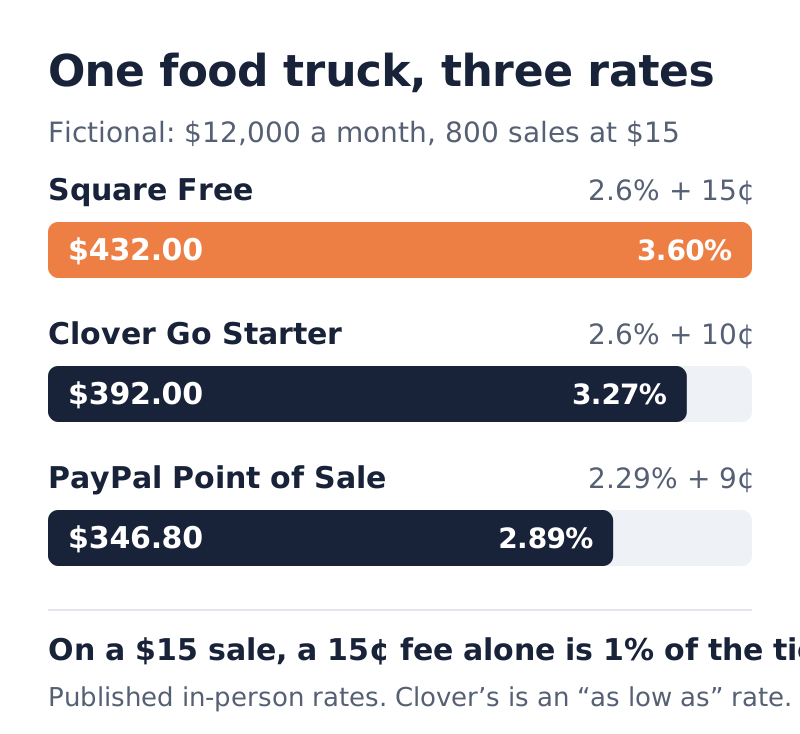
On a $15 ticket, Square's 15-cent fee alone is $0.15 / $15 = 1% of the sale, which is why Taco Run's effective rate on Square Free is 3.60%, not 2.6%. If the same $12,000 came from 200 sales at $60, the Square Free total would drop to $312.00 + (200 x $0.15) = $342.00, an effective 2.85%.
Clover's figure is an "as low as" rate, so Taco Run's real Clover rate could be higher. The Clover Go reader also costs $199 up front, against $59 for a Square Reader. None of these totals include a chargeback, an international card (Square adds 1.5% for cards issued in another country) or a monthly software plan. Use our credit card processing fee calculator to run your own numbers, and see what a credit card machine costs for terminal pricing.
Worked example: tap the card instead of typing it
A fictional plumbing contractor finishes a $2,400 job and the customer hands over a card.
- Tapped or dipped on Square Free: $2,400 x 2.6% + $0.15 = $62.40 + $0.15 = $62.55.
- Typed in by hand on Square: $2,400 x 3.5% + $0.15 = $84.00 + $0.15 = $84.15.
Typing the card costs $84.15 - $62.55 = $21.60 more on one job. At 10 jobs like that a month, it's $216 a month, or $2,592 a year, for skipping the tap. Square explains that manual entry costs more because neither the card nor the cardholder has to be present. If you take payment at the job site, carry a reader or use Tap to Pay. Our contractors page covers field-service setups.
Can You Take Mobile Payments Without Internet?
Sometimes, with limits. A card payment needs a connection to get an approval, so "offline mode" stores the payment and sends it later. You're taking a risk while it's stored.
Square's offline rules, from its help center:
- Tap to Pay on iPhone and Android can't take offline payments. Neither can manually entered cards.
- Square Reader for contactless and chip (2nd generation) can take offline payments for 24 hours, then must reconnect.
- Square Terminal, Register and Handheld must reconnect and upload offline payments within 72 hours of the start of the offline session, and Square highly recommends uploading within 24 hours.
- Payments not uploaded within 72 hours expire and can't be recovered.
- You carry the risk. Square says you won't be notified of declines while offline and you're responsible for expired, declined or disputed offline payments.
- You can cap it. Square lets you set a maximum offline amount per transaction, between $1 and $50,000.
For a food truck at a festival with a weak signal, a terminal with its own LTE connection is the first line of defense, and a low offline cap is the second. Our food truck payment processing page covers dead-zone setups.
Are Mobile Payments Secure?
A phone or reader from a mainstream provider is built to the same card-security standards as a counter terminal.
- Contactless uses one-time codes. Visa says each contactless transaction carries a one-time code, "just like contact EMV," and that its contactless cards carry the same security as its chip cards.
- Phone-based acceptance has its own PCI standard. The PCI Security Standards Council's Mobile Payments on COTS (MPoC) standard covers PIN and contactless acceptance on commercial off-the-shelf devices such as phones. It builds on the earlier SPoC and CPoC standards.
- Your habits still matter. Square's Tap to Pay on Android guidance says never to hand your phone to the customer, to watch for the Approved screen, and to turn on a passcode so no one can back out of the payment screen.
Square lists PCI compliance support among the services it doesn't charge for. If you process through your own merchant account, ask who handles PCI validation; our PCI compliance guide covers what small businesses are asked to do.
What Are the Downsides of Mobile Payments?
- Flat-rate pricing adds up. Taco Run's effective rate on Square Free was 3.60%. Flat rates are simple, but the per-sale fee hurts small tickets.
- Phone-only can't take every card. Tap to Pay takes contactless only, with no chip fallback.
- Connectivity. No signal can mean no sale, and Square's Tap to Pay doesn't work offline.
- Battery. A reader and the phone it pairs with both need charging; Clover rates the Go reader at about 130 contactless transactions per charge.
- Offline risk. Offline payments are approved later or not at all, and the loss is yours.
- No paper receipt unless your terminal has a printer.
Which Mobile Setup Fits Your Business?
- Occasional sales, low volume: Tap to Pay on the phone you already own, with a reader as backup for chip cards.
- Market vendors and pop-ups: a Bluetooth reader. It takes chip and tap for a small one-time cost.
- Food trucks and busy events: a portable terminal with LTE, a printer and a sensible offline cap.
- Contractors and home services: a reader or terminal so you never type a card at the job site. If you'd rather avoid hardware entirely, see how to accept credit card payments without a machine.
Once your monthly card volume grows, compare a flat rate against interchange-plus pricing on the same arithmetic used above. Our Clover POS pricing page shows Clover's published plans side by side.
If you already take mobile payments and want to know what you're really paying, send us a recent statement for a free statement review.
Sources
- Square, "Understanding Our Fees" (Square Free, Plus and Premium processing fees), observed October 2026.
- Square Support Center, "Learn about Square fees", observed October 2026.
- Square Support Center, "Process offline payments", observed October 2026.
- Square Support Center, "Accept payments with Tap to Pay on Android", observed October 2026.
- Square, "Square Reader for contactless and chip", observed October 2026.
- Apple, "Tap to Pay on iPhone", observed October 2026.
- Apple Developer, "Tap to Pay on iPhone", observed October 2026.
- Clover, "Clover Go: a mobile POS system", observed October 2026.
- Clover, "Clover Flex: the handheld POS system", observed October 2026.
- PayPal, "Fees" (PayPal Point of Sale rates), observed October 2026.
- Dejavoo, "P3 Secure Android Wireless", observed October 2026.
- Visa, "Contactless payments", observed October 2026.
- PCI Security Standards Council, "Mobile Payments on COTS", observed October 2026.
Frequently Asked Questions
What is mobile payment processing?
It's taking card payments away from a fixed counter, using a smartphone with Tap to Pay, a card reader paired with your phone, or a portable terminal with its own Wi-Fi or cellular connection. The payment still runs through a processor, which charges a fee on each sale.
How much does mobile credit card processing cost?
Published flat rates for in-person mobile payments include Square's 2.6% + 15 cents on its Free plan, Clover Go's Starter plan at as low as 2.6% + 10 cents, and PayPal Point of Sale at 2.29% + 9 cents for card-present sales. Typing a card in by hand costs more; Square charges 3.5% + 15 cents.
Which phones support Tap to Pay?
Apple says Tap to Pay on iPhone requires an iPhone Xs or later and a supported payment app. For Android, Square's guide asks for Android 9 or higher with NFC on, and says its Tap to Pay doesn't work on the Samsung Galaxy S8, S9 or Note 9. Your payment app may set its own requirements.
Can I take mobile payments without an internet connection?
Only on some devices. Square doesn't allow offline payments with Tap to Pay on iPhone or Android. Its card readers can take offline payments for 24 hours, offline payments expire if they aren't uploaded within 72 hours, and the merchant is responsible for any that are declined.
Do I need a card reader if I have Tap to Pay?
Not to take contactless cards and phone wallets. A reader adds chip card acceptance, which helps when a customer's card isn't contactless or the tap fails. Many mobile businesses use Tap to Pay as a backup and a reader or portable terminal as the main device.
About Payment USA’s Founder
Published by Payment USA, a merchant services provider. Our guides and comparisons reflect that commercial perspective.
Chase James
CEO, Payment USA
Chase James is the founder and CEO of Payment USA, a merchant services company built on transparency and fair pricing. With over 15 years in the payments industry, Chase has helped thousands of businesses uncover hidden processing fees and switch to honest, interchange-plus pricing.
Contact Chase →